Shop Sophomore
Check out what I did my sophomore year in shop!
Tomodachi Life Personality Test
I based this program off of my favorite Nintendo 3DS game, Tomodachi Life. When adding a new Mii to your island, you customise their personality based on speed, speech, expressiveness, and attitude. I decided to make a program that allows the user to input their personality traits to find out what personality their Mii would have.
I started the process of creating this program by looking at how the personality is calculated. Uniqueness does not have an effect on the personality, so I did not include it in the questions. I came across a helpful chart that explained how the personality was calculated. To test it’s accuracy, I went home and tested it out with many different cases. From all the cases I tested, it was accurate. The next day I came in and got working. With my program, the player has to choose a number 1-8 responding on how similar the user is to the question.
To make my program work correctly, I included the cases where a user does not input a valid number. Looking back at this program, I do not like the amount of if statements used. Though they were nessecary, I could have made the if statements have better readability. I could have used variables for the “magic numbers” or numbers used in equations without any context. I used these “magic numbers” when deciding which column and row the user would be on the personality chart. Overall, I am happy that my program works correctly, but if I would remake it, I would make it more readable.
Make A Keyboard
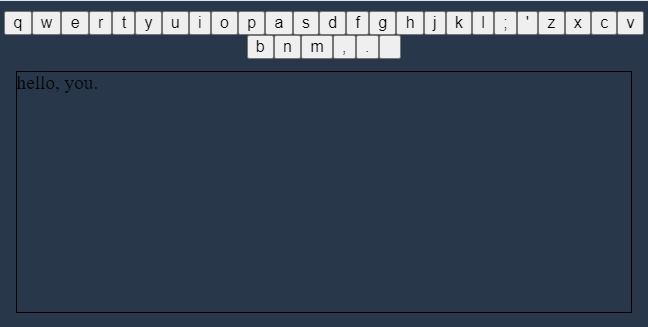
The purpose of this program was to create a keyboard that you could type a message on. This program required functions named makeKeyboard, makeButton, and makeText that would be the functionality of the program. This assignment was split into three different parts, one for each function.
The first step was to create the makeButton function. This function took the parameter and created a button on the keyboard by creating a button element and making the innerHTML the parameter. Next I moved onto the makeText function. I struggled more with this function because my text would print in a separate row from the rest of the text. I figured out I needed to put letter.innerHTML= letter.innerHTML+this.innerHTML. This would print what was originally inside the text with the key pressed by the user. My last function was makeKeyboard. This function ran through the list alpha that stored all the characters on a keyboard and created them as buttons using makeButton. Once finished writing all the functions, I called the function makeKeyboard which created the entire keyboard. When a button on the keyboard was pressed, it would print the letter clicked.